One Platform, Every Device
Manage Your Shop from Desktop & Mobile.
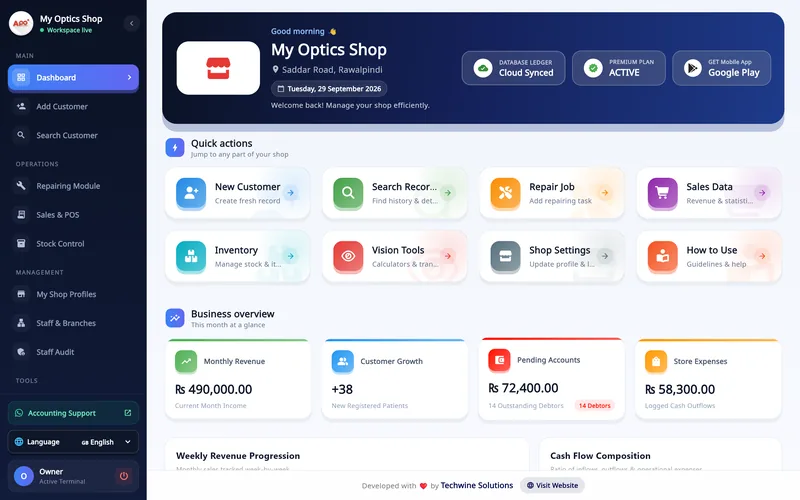
Access your data from the Windows desktop app for full power, or use the Android app to check sales, customers and repairs on the go.
Full Desktop Power
Asaan Optics Desktop, Windows 10 and 11
Optimized for mouse and keyboard workflows to speed up customer entry.
- Dashboard
- Add Customer and prescriptions
- Search Customer and khata
- Repairs
- Sales & POS
- Stock: frames, lenses, vendors
- Shop profile, WhatsApp, tax and QR
- Staff logins and permissions
One account, the same records
- Customers and prescriptions
- Repair jobs
- Sales and expenses
- Stock levels
- Shop settings and WhatsApp templates
Both apps keep working offline and sync saved records later.
Mobile Freedom
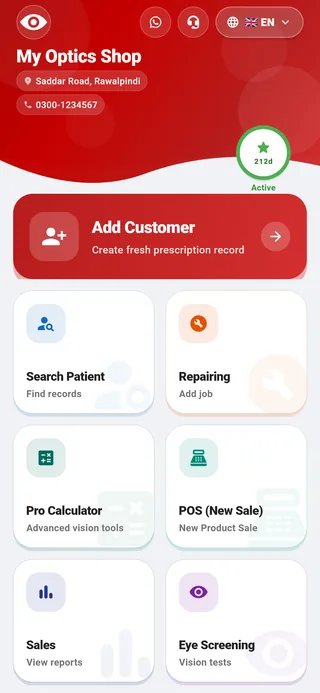
Asaan Optics mobile, Android
Check today's sales from anywhere using the mobile app.
- Add prescription with Scan Prescription
- Search Patient and QR receipt lookup
- Repairs
- New sale from the shop's stock
- Sales record and expenses
- Optical tools
- WhatsApp receipts
- Fingerprint or face login
Stock is managed on the desktop; the phone sells from the same stock.
Free optical tools. The transposition calculator and other optical calculators, in the app and on this website.
Prescriptions and orders
Enter the prescription once. The order builds around it.
The Add Customer screen holds both eyes, then the frame and lens from your stock, an optional lab or vendor, and the payment and delivery date. One save creates the order and its receipt.
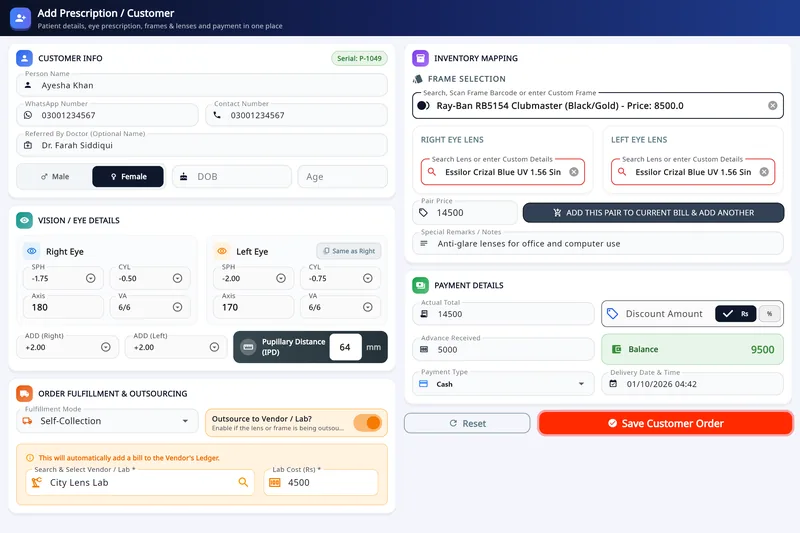
- Right and left eye: SPH, CYL, AXIS and VA, with ADD and PD
- Frame and lens picked from stock
- Outsource the job to a lab or vendor
- Advance, balance and delivery date
Customers, sales and stock
Three more desktop screens a shop uses every day. The Desktop page walks through each one.
-
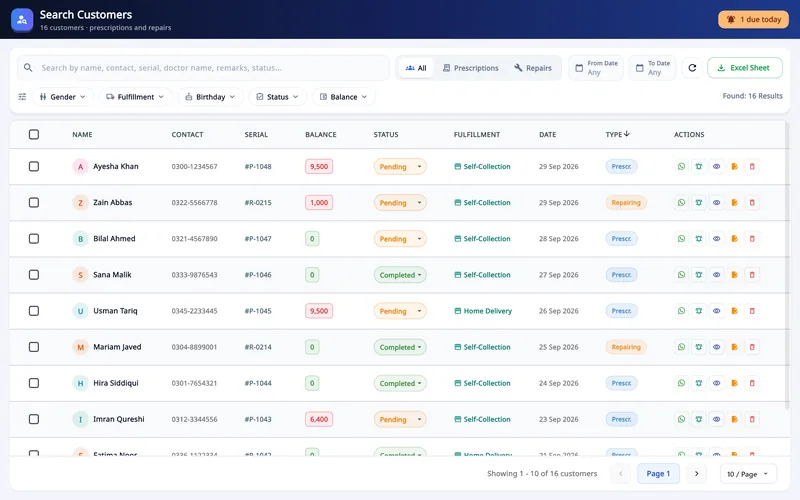
Customers and follow-up
Search Customers filters every order and repair, shows today's deliveries and sends pickup reminders.
-
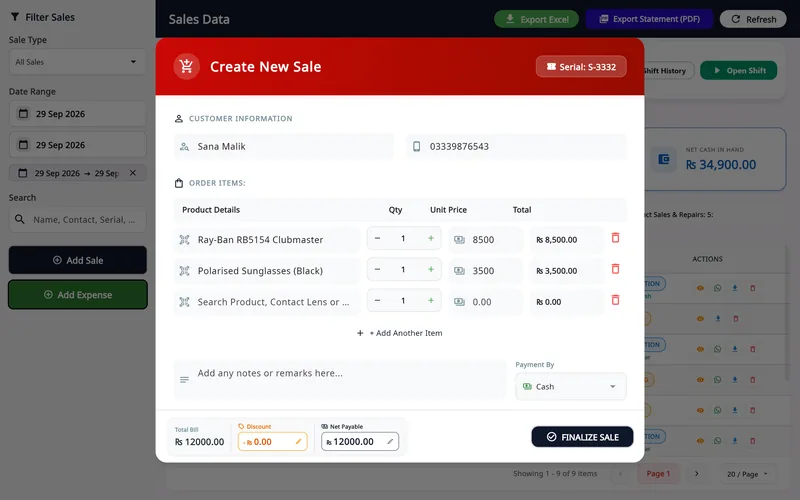
Sales and POS
Create New Sale bills frames, lenses and products by search or barcode, with discount and payment.
-
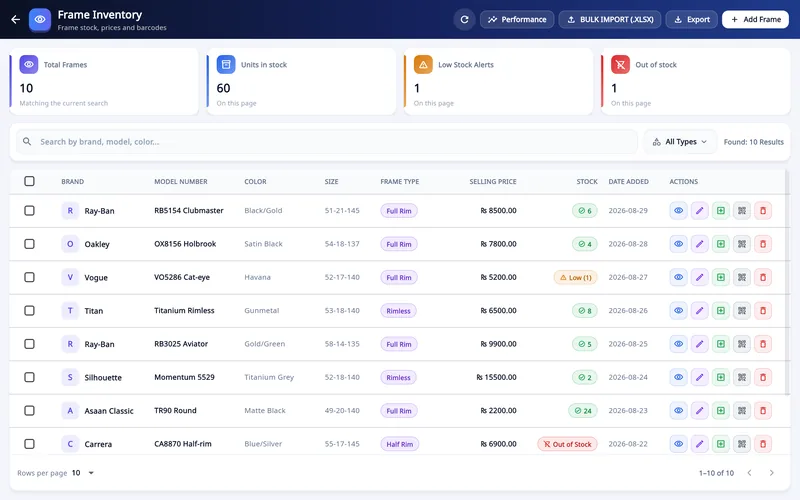
Stock
Frame Inventory keeps each frame by brand, model, colour and size, with low-stock alerts.
Also on the desktop: the Stock Control Center, staff shifts with a counted cash drawer and X/Z reports, a staff audit, and 19 optical calculators.
See them on the Desktop pageWorkflow
From prescription to pickup
One record follows the customer through the shop. The prescription is entered once, then billed, printed or shared, and tracked until the glasses are collected.
-
1Prescription
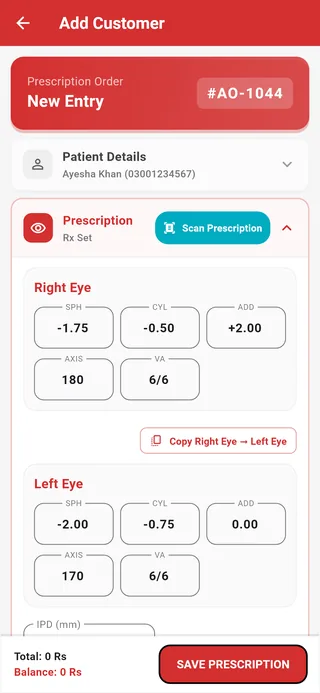
Patient details and both eyes, entered once.
-
2Bill and receipt
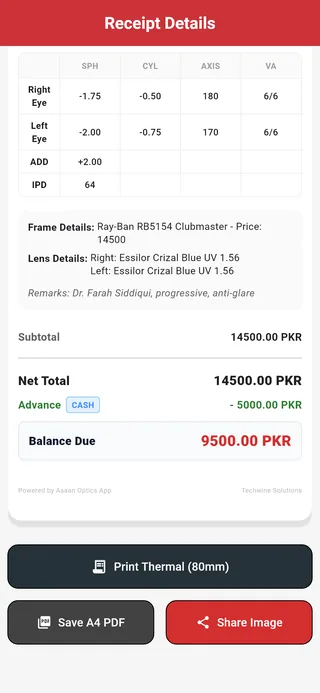
Frame, lens, advance and balance on one receipt.
-
3Repairs and lab jobs
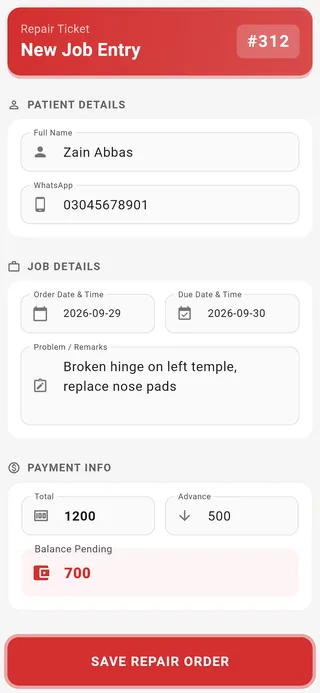
A ticket with received and due dates.
-
4Follow-up
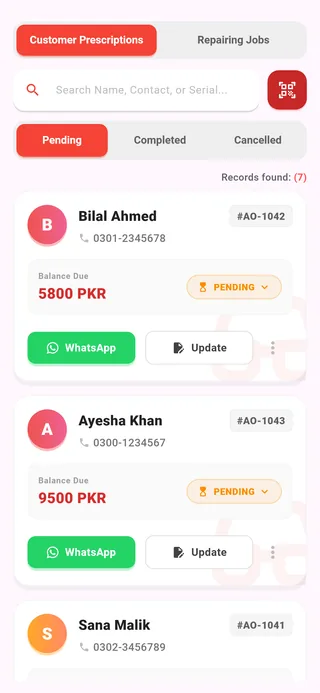
Pending and completed orders, with WhatsApp one tap away.
Free Optician Tools
We provide free utilities for the eyewear community. Use our free Optical Transposition Calculator to convert plus/minus cylinder prescriptions instantly.
Worked example
| SPH | CYL | AXIS | |
|---|---|---|---|
| Written | +4.00 | −1.50 | 120 |
| Transposed | +2.50 | +1.50 | 30 |
Spherical equivalent: +3.25
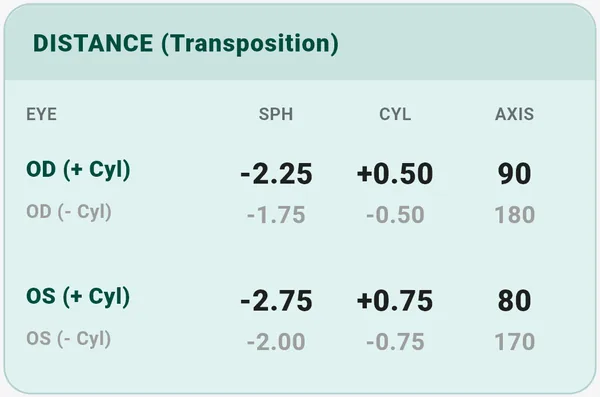
Calculators and the formulas they use
- Transposition
- SPH + CYL, −CYL, AXIS ± 90°
- Spherical equivalent
- SPH + CYL ÷ 2
- Vertex distance
- F ÷ (1 − d·F) (d in metres)
- Prentice's rule
- c × F ÷ 10 (c in mm)
- Oblique meridian
- S + C·sin²θ
- Minimum blank size
- ED + decentration + 2 mm
Watch Asaan Optics In Action
See How Easy It Is
Watch a quick walkthrough of creating a bill and managing inventory.

Fair & Transparent Plans
Flexible Pricing for Optical Shops & Eye Clinics
Choose the ideal plan tailored to your retail scale. Every plan includes billing and continuous software updates, Desktop Pro adds stock control, and your first 30 days are free.
Mobile Application, Android
Mobile Optician Plan
Manage customer prescriptions, automated WhatsApp receipts and quick sales on the go.
- Unlimited Eye Prescriptions & History
- Instant WhatsApp Digital Receipts
- Optical Transposition Calculator
- 30-Day Free Trial Evaluation
Flagship POS System, Windows PC Edition
Desktop Pro
Comprehensive retail point-of-sale, thermal printing, ZATCA-format QR receipts, and shifts reconciliation.
- ZATCA, GST & VAT QR Code System
- Shifts Closing & Register Reconciliation
- 8 International Languages with Native RTL
- Custom Alert Message Templates
PC + mobile
All-in-One Bundle
Desktop Pro on the PC and the mobile app on the phone, kept in sync.
- Everything in Desktop Pro
- The full mobile app (Android)
- Cloud sync between PC and phone
- WhatsApp receipts on PC and mobile
Prices are shown in your local currency on the pricing page.
Easy Onboarding
Start Managing in Minutes
Start only in 3 steps.
-
1
Download & Install
Click the download button to get the Windows installer. Run it to install Asaan Optics.
-
2
Register Shop
Open the app. Register with your shop details and confirm your email.
-
3
Start Managing
Log in, add your inventory, and start creating bills. It's that simple.
See Asaan Optics in action
Two short videos: what the software is, and one working day from the first order to closing.
Watch: what Asaan Optics is, in 90 seconds
Video, 1 min 26 s
New to optical shop software? In ninety seconds this explainer sets out what Asaan Optics is: one place for the customers, prescriptions, orders, stock and staff of an optical shop, so that nothing lives in a notebook or a spreadsheet.
Chapters
- 00:00What Asaan Optics is
- 00:18One customer order
- 00:32Sales at the counter
- 00:43Stock Control
- 00:55Staff and audit
- 01:07Windows, Android and languages
Transcript
Asaan Optics is software for running an optical shop. Here is what it does, in ninety seconds.
An optical shop has customers, prescriptions, orders, stock, and staff. Asaan Optics keeps all of them in one place, so nothing lives in a notebook or a spreadsheet.
The task you do most is one customer order. You type the customer, enter the prescription, choose the frame and lenses from your stock, take the payment, and the receipt is ready to print, or to send as a WhatsApp message.
For sales without a prescription, there is Sales and POS. Scan a barcode or search by name, choose cash, card or bank transfer, and the day's totals keep themselves up to date.
Stock Control lists every frame and lens with its price and quantity. When you save an order or a sale, the stock goes down by itself, and items that are running out are marked as low stock.
Each member of staff gets their own sign-in, and you choose the screens they can open. Staff Audit then shows you who sold what, which discounts went above the limit, and whether the cash matched.
Asaan Optics runs on Windows computers, and there is an Android app as well. Both come in several languages, including Arabic, French, Spanish and Turkish. You can start free.
Watch a full working day, from first order to closing
Video, 3 min 10 s
See optical store software doing a full day's work: this demo follows one shop from nine o'clock to closing in Asaan Optics. The day has three ordinary jobs, a new prescription order with an advance, a sunglasses sale at the counter and a customer collecting finished glasses, and each one is entered once.
Chapters
- 00:00The shop opens
- 00:10Orders due today
- 00:31A new prescription order
- 01:17A sale at the counter
- 01:56A customer collects
- 02:23Closing the day
Transcript
Follow one optical shop through a working day, from opening to closing. It is nine o'clock at Northlight Opticians. Before the first customer arrives, the first question is what is due today.
Open Search Customer. The bell at the top counts the orders that are due for collection today. Three orders are due. Sophie Laurent has paid in full. Lucas Martin still has two hundred pounds to pay when he collects.
Mid-morning, Emily Carter comes out of her eye test with a new prescription. Her order starts in Add Customer, with her name and her WhatsApp number. The result of the eye test goes in next: sphere, cylinder and axis for the right eye. Her left eye is the same, so one click copies it. She picks a Ray-Ban frame from the stock. For the lenses, the ones that match her prescription are listed first. The total is worked out. Emily pays one hundred pounds in advance, and the balance is shown beside it. Save the order, and the receipt opens, ready to print. A confirmation goes to her WhatsApp at the same moment.
At lunchtime, Daniel Murphy, a regular customer, walks in for sunglasses and a case. Open Sales and POS, and click Add Sale. Type the first letters of his name, and pick him from the saved customers. Scan the barcode of the sunglasses, and the item drops in with its price. The case has no label, so search for it by name. He pays by card, so choose Card. Then click Finalise Sale, and skip the printed receipt this time. The sale is saved, at the top of today's list.
In the afternoon, Lucas Martin comes in for his glasses. Emily Carter's order from this morning is already at the top of the list. He pays the two hundred pounds still owing. Take the money first, then open the status on his row and choose Completed. His balance drops to zero, and the payment is recorded as a sale for today. A thank-you message goes to his WhatsApp.
Closing time. Open Sales and POS once more. These four cards are the day in numbers: total sales, cash in, expenses, and the net amount. Nobody added them up. Each task of the day put its own payment here. And the list shows where the money came from: the balance from Lucas, the sale to Daniel, and the advance from Emily. That is one day at Northlight Opticians: one new order, one counter sale and one collection, each entered once. Tomorrow starts the same way, with the bell and the orders that are due.
Optical shop software, explained
What optical shop software is, how it differs from a generic POS, a buyer's checklist and a glossary of the terms opticians meet.
Frequently Asked Questions
Everything you need to know about modernizing your optical shop workflow, subscriptions, and security safeguards.
Still have a question?
Message us on WhatsApp or use the contact page.
Transform Your Optical Business Today
Join the optical professionals who have modernized their shops with our all-in-one management solution.
- Windows 10/11 Optimized
- Desktop and phone share one account
- Billing works offline
Join Asaan Optics Community
Get instant support, feature updates, and connect with other Optical Shop owners. Be part of the revolution!